Introduction
Wanderer’s expanded public API now lets you retrieve all characters in the system and manage “Access Lists” (ACLs) for controlling visibility or permissions. These endpoints allow you to:
- Fetch a list of all EVE characters known to the system.
- List ACLs for a given map.
- Create new ACLs for maps (with automatic API key generation).
- Update existing ACLs.
- Add, remove, and change the roles of ACL members.
This guide provides step-by-step instructions, request/response examples, and details on how to authenticate each call.
Authentication
Unless otherwise noted, these endpoints require a valid Bearer token. Pass it in the Authorization header:
Authorization: Bearer <REDACTED_TOKEN>
If the token is missing or invalid, you’ll receive a 401 Unauthorized error.
(No API key is required for some “common” endpoints, but ACL- and character-related endpoints require a valid token.)
There are two types of tokens in use:
-
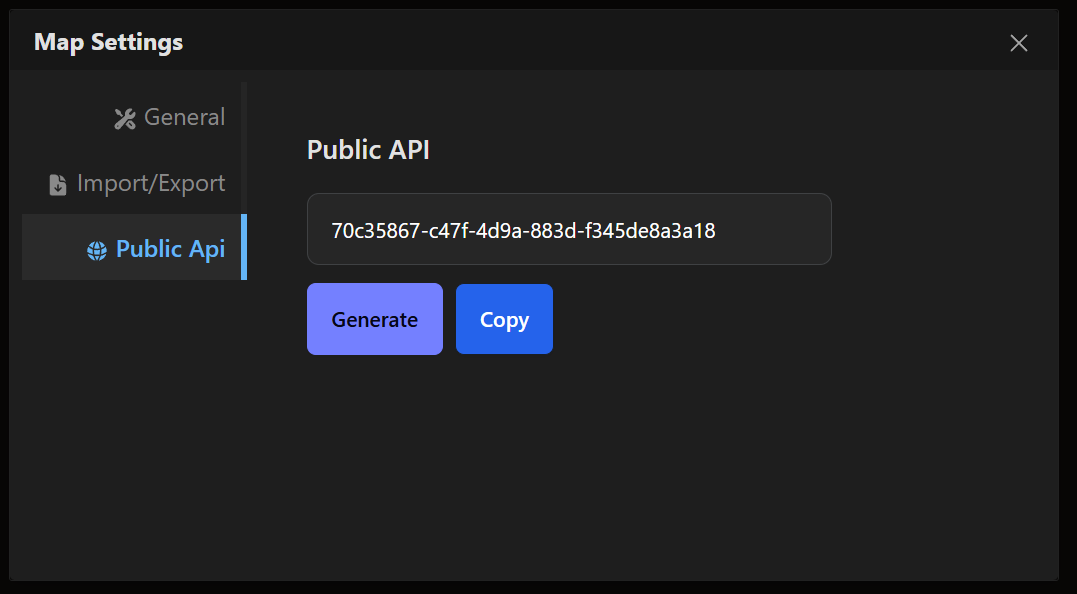
Map API Token: Available in the map settings. This token is used for map-specific endpoints (e.g. listing ACLs for a map and creating ACLs).
-
ACL API Token: Available in the create/edit ACL screen. This token is used for ACL member management endpoints.

Endpoints Overview
1. List All Characters
GET /api/characters- Description: Returns a list of all characters known to Wanderer.
-
Toggle: Controlled by the environment variable
WANDERER_CHARACTER_API_DISABLED(default isfalse). - Example Request:
curl -H "Authorization: Bearer <REDACTED_TOKEN>" \
"https://wanderer.example.com/api/characters"- Example Response (redacted):
{
  "data": [
    {
      "id": "b374d9e6-47a7-4e20-85ad-d608809827b5",
      "name": "Some Character",
      "eve_id": "2122825111",
      "corporation_name": "School of Applied Knowledge",
      "alliance_name": null
    },
    {
      "id": "6963bee6-eaa1-40e2-8200-4bc2fcbd7350",
      "name": "Other Character",
      "eve_id": "2122019111",
      "corporation_name": "Some Corporation",
      "alliance_name": null
    }
    ...
  ]
}
Use the eve_id when referencing a character in ACL operations.
2. List ACLs for a Given Map
GET /api/map/acls?map_id=<UUID>
GET /api/map/acls?slug=<map-slug>-
Description: Lists all ACLs associated with a map, specified by either
map_id(UUID) orslug(map slug). - Authentication: Requires the Map API Token (available in map settings).
- Example Request (using slug):
curl -H "Authorization: Bearer <REDACTED_TOKEN>" \
"https://wanderer.example.com/api/map/acls?slug=mapname"- Example Response (redacted):
{
  "data": [
    {
      "id": "19712899-ec3a-47b1-b73b-2bae221c5513",
      "name": "aclName",
      "description": null,
      "owner_eve_id": "11111111111",
      "inserted_at": "2025-02-13T03:32:25.144403Z",
      "updated_at": "2025-02-13T03:32:25.144403Z"
    }
  ]
}
3. Show a Specific ACL (Including Members)
GET /api/acls/:id- Description: Fetches a single ACL by ID, with its members preloaded.
- Authentication: Requires the ACL API Token.
- Example Request:
curl -H "Authorization: Bearer <REDACTED_TOKEN>" \
"https://wanderer.example.com/api/acls/19712899-ec3a-47b1-b73b-2bae221c5513"- Example Response (redacted):
{
  "data": {
    "id": "19712899-ec3a-47b1-b73b-2bae221c5513",
    "name": "aclName",
    "description": null,
    "owner_id": "d43a9083-2705-40c9-a314-f7f412346661",
    "members": [
      {
        "id": "8d63ab1e-b44f-4e81-8227-8fb8d928dad8",
        "name": "Character Name",
        "role": "admin",
        "eve_character_id": "2122019111",
        "inserted_at": "2025-02-13T03:33:32.332598Z",
        "updated_at": "2025-02-13T03:33:36.644520Z"
      },
      {
        "id": "7e52ab1e-c33f-5e81-9338-7fb8d928ebc9",
        "name": "Corporation Name",
        "role": "viewer",
        "eve_corporation_id": "98140648",
        "inserted_at": "2025-02-13T03:33:32.332598Z",
        "updated_at": "2025-02-13T03:33:36.644520Z"
      },
      {
        "id": "6f41bc2f-d44e-6f92-8449-8ec9e039fad7",
        "name": "Alliance Name",
        "role": "viewer",
        "eve_alliance_id": "99013806",
        "inserted_at": "2025-02-13T03:33:32.332598Z",
        "updated_at": "2025-02-13T03:33:36.644520Z"
      }
    ]
  }
}
Note: The response for each member will include only one of eve_character_id, eve_corporation_id, or eve_alliance_id depending on the type of member.
4. Create a New ACL Associated with a Map
POST /api/map/acls- Description: Creates a new ACL for a map and generates a new ACL API key. The map record tracks its ACLs.
-
Required Query Parameter: Either
map_id(UUID) orslug(map slug). - Request Body Example:
{
  "acl": {
    "name": "New ACL",
    "description": "Optional description",
    "owner_eve_id": "EXTERNAL_EVE_ID"
  }
}-
owner_eve_idmust be the external EVE id (theeve_idfrom/api/characters). - Example Request (using map slug):
curl -X POST \
  -H "Authorization: Bearer <MAP_API_TOKEN>" \
  -H "Content-Type: application/json" \
  -d '{
        "acl": {
          "name": "New ACL",
          "description": "Optional description",
          "owner_eve_id": "EXTERNAL_EVE_ID"
        }
      }' \
"https://wanderer.example.com/api/map/acls?slug=mapname"- Example Request (using map UUID):
curl -X POST \
  -H "Authorization: Bearer <MAP_API_TOKEN>" \
  -H "Content-Type: application/json" \
  -d '{
        "acl": {
          "name": "New ACL",
          "description": "Optional description",
          "owner_eve_id": "EXTERNAL_EVE_ID"
        }
      }' \
"https://wanderer.example.com/api/map/acls?map_id=YOUR_MAP_UUID"- Example Response (redacted):
{
  "data": {
    "id": "NEW_ACL_UUID",
    "name": "New ACL",
    "description": "Optional description",
    "owner_id": "OWNER_ID",
    "api_key": "GENERATED_ACL_API_KEY",
    "inserted_at": "2025-02-14T17:00:00Z",
    "updated_at": "2025-02-14T17:00:00Z",
    "members": []
  }
}
5. Update an ACL
PUT /api/acls/:id-
Description: Updates an existing ACL (e.g. name, description, api_key).
The update endpoint fetches the ACL record first and then applies the update. - Authentication: Requires the ACL API Token.
- Example Request:
curl -X PUT \
  -H "Authorization: Bearer <ACL_API_TOKEN>" \
  -H "Content-Type: application/json" \
  -d '{
        "acl": {
          "name": "Updated ACL Name",
          "description": "This is the updated description",
          "api_key": "EXISTING_ACL_API_KEY"
        }
      }' \
"https://wanderer.example.com/api/acls/ACL_UUID"- Example Response (redacted):
{
  "data": {
    "id": "ACL_UUID",
    "name": "Updated ACL Name",
    "description": "This is the updated description",
    "owner_id": "OWNER_ID",
    "api_key": "EXISTING_ACL_API_KEY",
    "inserted_at": "2025-02-14T16:49:13.423556Z",
    "updated_at": "2025-02-14T17:22:51.343784Z",
    "members": []
  }
}
6. Add a Member to an ACL
POST /api/acls/:acl_id/members- Description: Adds a new member (character, corporation, or alliance) to the specified ACL.
- Authentication: Requires the ACL API Token.
-
Request Body Example:
For character membership, useeve_character_id. For corporation, useeve_corporation_id. For alliance, useeve_alliance_id.
{
  "member": {
    "eve_character_id": "EXTERNAL_EVE_ID",
    "role": "viewer"
  }
}- Example Request for Character:
curl -X POST \
  -H "Authorization: Bearer <ACL_API_TOKEN>" \
  -H "Content-Type: application/json" \
  -d '{
        "member": {
          "eve_character_id": "EXTERNAL_EVE_ID",
          "role": "viewer"
        }
      }' \
"https://wanderer.example.com/api/acls/ACL_UUID/members"- Example Request for Corporation:
curl -X POST \
  -H "Authorization: Bearer <ACL_API_TOKEN>" \
  -H "Content-Type: application/json" \
  -d '{
        "member": {
          "eve_corporation_id": "CORPORATION_ID",
          "role": "viewer"
        }
      }' \
"https://wanderer.example.com/api/acls/ACL_UUID/members"- Example Response for Character (redacted):
{
  "data": {
    "id": "MEMBERSHIP_UUID",
    "name": "Character Name",
    "role": "viewer",
    "eve_character_id": "EXTERNAL_EVE_ID",
    "inserted_at": "...",
    "updated_at": "..."
  }
}- Example Response for Corporation (redacted):
{
  "data": {
    "id": "MEMBERSHIP_UUID",
    "name": "Corporation Name",
    "role": "viewer",
    "eve_corporation_id": "CORPORATION_ID",
    "inserted_at": "...",
    "updated_at": "..."
  }
}
7. Change a Member’s Role
PUT /api/acls/:acl_id/members/:member_id-
Description: Updates an ACL member’s role (e.g. from
viewertoadmin). The:member_idis the external EVE id (or corp/alliance id) used when creating the membership. - Authentication: Requires the ACL API Token.
- Request Body Example:
{
  "member": {
    "role": "admin"
  }
}- Example Request:
curl -X PUT \
  -H "Authorization: Bearer <ACL_API_TOKEN>" \
  -H "Content-Type: application/json" \
  -d '{
        "member": {
          "role": "admin"
        }
      }' \
"https://wanderer.example.com/api/acls/ACL_UUID/members/EXTERNAL_EVE_ID"- Example Response (redacted):
{
  "data": {
    "id": "MEMBERSHIP_UUID",
    "name": "Character Name",
    "role": "admin",
    "eve_character_id": "EXTERNAL_EVE_ID",
    "inserted_at": "...",
    "updated_at": "..."
  }
}
Note: The response will include only one of eve_character_id, eve_corporation_id, or eve_alliance_id depending on the type of member.
8. Remove a Member from an ACL
DELETE /api/acls/:acl_id/members/:member_id- Description: Removes the member with the specified external EVE id (or corp/alliance id) from the ACL.
- Authentication: Requires the ACL API Token.
- Example Request:
curl -X DELETE \
  -H "Authorization: Bearer <ACL_API_TOKEN>" \
"https://wanderer.example.com/api/acls/ACL_UUID/members/EXTERNAL_EVE_ID"- Example Response:
{ "ok": true }Conclusion
This guide outlines how to:
-
List all characters (
GET /api/characters) so you can pick a valid character to add to your ACL. -
List ACLs for a specified map (
GET /api/map/acls?map_id=<UUID>or?slug=<map-slug>). -
Show ACL details, including its members (
GET /api/acls/:id). -
Create a new ACL for a map (
POST /api/map/acls), which generates a new ACL API key. -
Update an existing ACL (
PUT /api/acls/:id). -
Add members (characters, corporations, alliances) to an ACL (
POST /api/acls/:acl_id/members). -
Change a member’s role (
PUT /api/acls/:acl_id/members/:member_id). -
Remove a member from an ACL (
DELETE /api/acls/:acl_id/members/:member_id).
By following these request patterns, you can manage your ACL resources in a fully programmatic fashion. If you have any questions, feel free to reach out to the Wanderer Team.
Fly safe,
The Wanderer Team